Business expense tracking: organize, automate and review costs

For Canadian businesses, effective expense tracking starts with clear categories and spending guidelines, timely transaction records, retained receipts and regular reviews. These business expense tracking best practices turn day-to-day costs into useful information for managing cash flow and making decisions.
Receipts, reimbursements and bank transactions can feel like a second set of books. Manual processes add data-entry work and make errors or spending patterns harder to spot. A consistent system gives each expense a clear place and purpose.
This article explains how Canadian businesses can build a reliable expense management process, from setting categories and importing transactions to reviewing expenses and records. It also covers what to look for in expense-tracking software, including receipt capture, approvals and accounting integrations. The goal is practical: spend less time sorting transactions and get a clearer view of where business funds go.
Key Takeaways
- Set up clear expense categories and custom rules, then review unusual transactions before they flow into your reports.
- Connect business payment accounts to your tracking system to reduce manual entry and keep transaction records aligned.
- Use mobile receipt capture to attach supporting documents while expense details are easy to remember.
- Review spending patterns and reconcile records regularly to spot errors, policy issues and opportunities to refine budgets.
- Choose a Canadian expense-tracking app based on its receipt tools, approval features, customizable categories and fit with your accounting workflow.
1. Can I create custom rules to automatically categorize expenses?
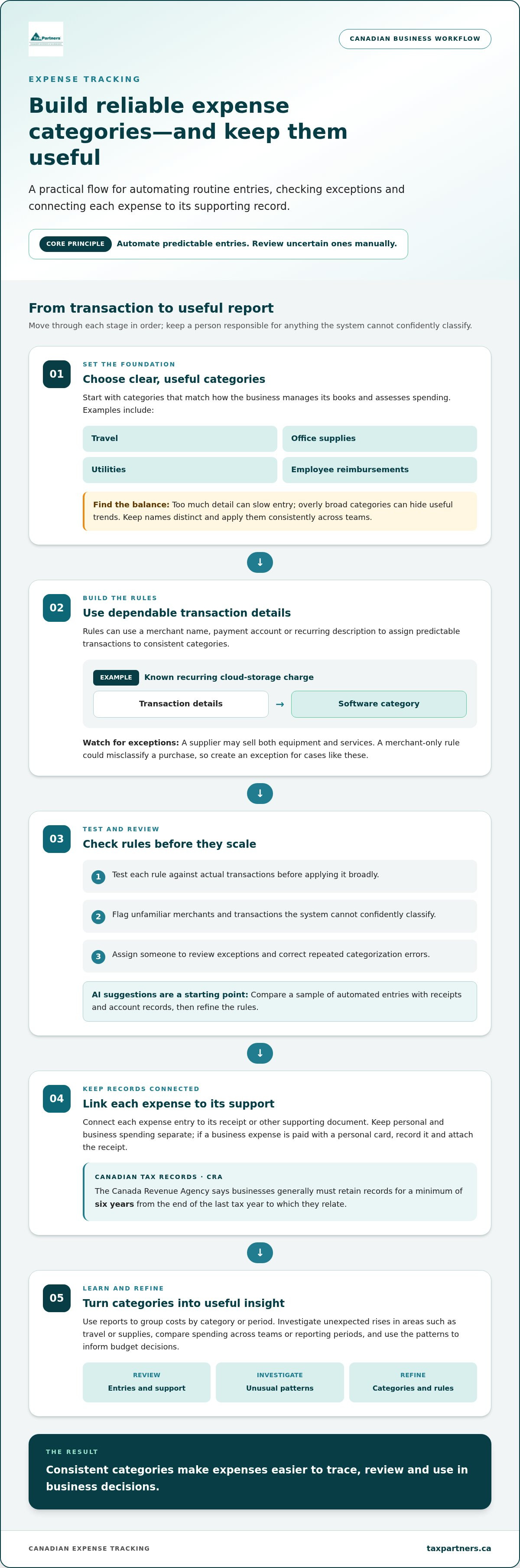
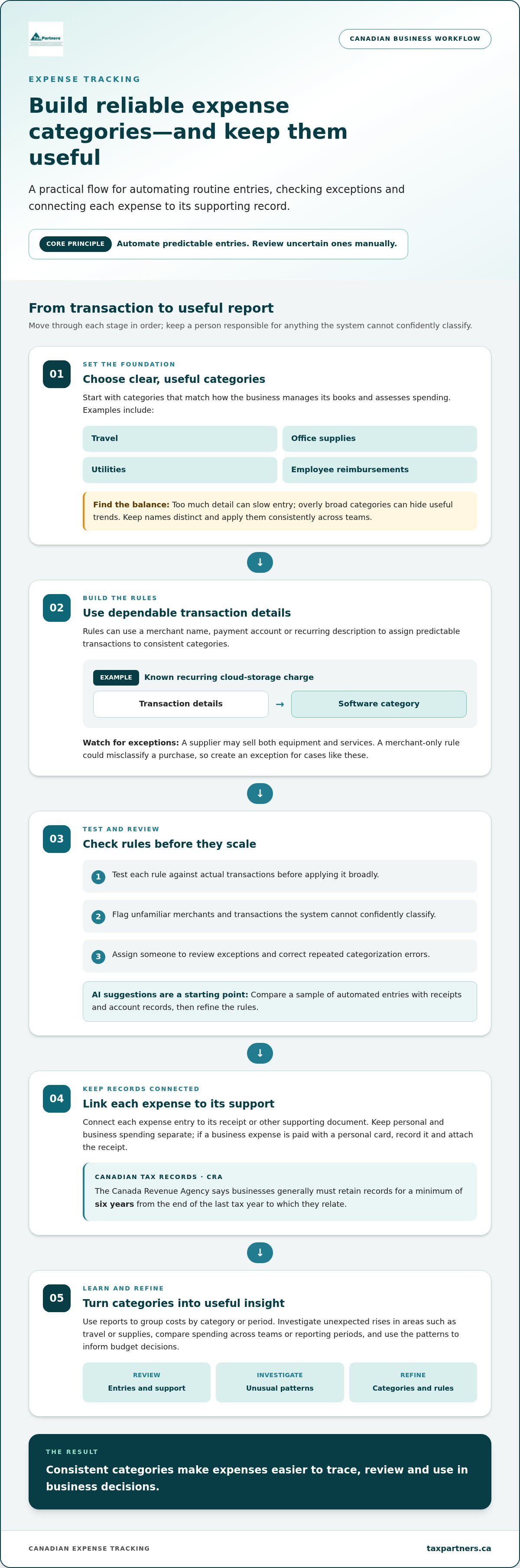
Yes. Set rules in your expense system to assign recurring transactions to consistent categories, then review exceptions before posting them. For example, a monthly charge from a known cloud-storage vendor could be categorized as software, while an unfamiliar merchant is flagged. This speeds up routine categorization without treating every transaction alike. Two useful business expense tracking best practices are automating predictable entries and reviewing uncertain ones manually.
Begin with categories that match how you manage your books and assess spending. Common examples include travel, office supplies, utilities and employee reimbursements. Keep category names distinct and apply them consistently across teams. Too much detail can slow entry; overly broad categories can hide useful trends. These business expense tracking best practices help keep reports clear as your business adds suppliers or changes its purchasing patterns.
Create rules using dependable transaction details, such as a merchant name, payment account or recurring description. Test each rule against actual transactions before applying it broadly. If a supplier sells both equipment and services, a merchant-only rule could misclassify purchases. Set an exception for these cases and assign someone to review transactions the system can’t confidently classify.
AI-based categorization can suggest categories using transaction descriptions and past entries. Treat each suggestion as a starting point, not a substitute for review. Compare a sample of automated entries with receipts and account records, correct repeated errors, then refine the rules. Analytics can group costs by category or period, helping you investigate an unexpected rise in travel or supplies.
For Canadian tax records, connect each expense entry to its receipt or other supporting document. The Canada Revenue Agency says businesses generally must retain records for a minimum of six years from the end of the last tax year to which they relate. Clear categories make it easier to trace a reported expense to its source document and explain how it was recorded.
Categories should support reporting, not just data entry. A consistent travel category, for instance, lets managers compare spending across teams or reporting periods and investigate changes. Keep personal and business spending separate. If someone pays a business expense with a personal card, record the transaction and attach its receipt. When navigating significant assets where business and personal use frequently overlap, resources from Stewart Private Accounting illustrate how separating operational costs and tax considerations early protects your reporting. Use the resulting reports to identify patterns and inform budget decisions.
2. Connecting bank and payment accounts to import transactions
Connect the business bank account and payment accounts used for company spending to your expense-tracking software. Imports bring transaction details into one workflow, reducing rekeying and making it easier to compare recorded spending with bank activity. A dedicated business bank account helps separate company transactions from personal ones and gives your bookkeeping system a clearer source.
Before enabling an import, map each connected account to the correct ledger account in your accounting system. For example, a business credit card should feed its own liability account, while chequing transactions should appear in the matching bank account. Check that dates, descriptions and amounts land in the expected fields, then compare a sample with the financial institution’s transaction report.
Build the connection around your accounting workflow, not as a standalone data feed. Decide who reviews imported transactions, who resolves missing details and when approved entries move into the books. If payment software and accounting software both record a transaction, compare their records to prevent duplicates. Keep each source transaction identifiable so a reviewer can trace it to the relevant account.
Imports support oversight, but they don’t establish whether a purchase follows company policy. Set spending guidelines that explain which expenses need approval and what information employees must submit. For example, require a business purpose and receipt for a card purchase, then route it to the employee’s manager. Automated approvals and documentation can make the process more consistent.
Corporate card transaction reports also help managers monitor spending against approved budgets. Use them alongside imported records to identify transactions that need an explanation, such as a charge with no receipt or a purchase outside a team’s usual spending. Set access levels so employees, approvers and bookkeeping staff can complete their tasks without giving everyone the same system permissions.
Review the connection when you add an account, change payment processes or update accounting software. Confirm that each active account imports correctly, that duplicate entries are handled, and that transactions reach the intended ledger. This routine keeps financial data useful for decisions, rather than creating another list to reconcile. If account feeds are complicating your Canadian reporting workflow, discuss your accounting records with a professional.
3. What is business expense management?
Business expense management covers how an organization records, supports and reviews company costs. It includes direct expenses, such as travel and supplies, and indirect costs, such as utilities and employee reimbursements. A clear process connects each purchase to its business purpose, supporting receipt and accounting entry. For example, a team can track a travel expense from employee submission through approval and bookkeeping.
Expense management software brings these steps into a shared workflow. An employee can capture a receipt on a mobile device soon after buying supplies, add the vendor and business purpose, then submit the expense for review. Digital uploads and automated data entry reduce manual work and the risk of transcription errors. This creates a more complete record while purchase details are still easy to recall.
Choose software by matching its features to the tasks your team handles. A small team with occasional purchases may need straightforward receipt capture and review, while a company with frequent reimbursements may need routing by department or approver. Test the employee journey from receipt upload to approval. Include a less frequent expense, such as a utility invoice, to see how the workflow handles different documents.
Good expense-tracking software should make common tasks simple, not bury them in extra steps. Assess these capabilities against your actual expense process:
- Mobile capture: Employees can photograph a receipt and attach it to the matching transaction.
- Data extraction: Automated entry can collect details such as the date, vendor and total for review.
- Approvals: A submitted reimbursement can move to the right manager with its supporting document.
- Reporting: Managers can examine spending by category, team or period to identify patterns.
Before adopting an expense management system, test a real workflow with employees and approvers. Check that receipt images remain readable, required fields are clear and an approver can return an incomplete submission. These practical checks reveal friction that a feature list alone may miss. For hybrid teams, mobile access also lets employees submit expenses without waiting to return to the office.
Keep the software’s purpose clear: organize expense information so people can act on it. For example, a manager reviewing monthly utility costs can compare recorded bills and investigate a change. Bookkeeping staff can use attached receipts to support entries, while leaders use consolidated reports to guide budgets. The best fit supports these everyday decisions without adding unnecessary administration.
4. Regular audits and process optimization
A regular expense review checks whether recorded purchases match receipts, approvals and account activity. Reconcile each statement against the bookkeeping records, then investigate missing documents, duplicate entries or unexplained charges. For example, a corporate credit card charge without a receipt needs follow-up before the period’s records are finalized.
Use spending analytics to compare categories, teams and reporting periods. A sharp increase in delivery supplies could point to changing order volumes, excessive packaging or a coding error. Review the underlying transactions before changing a budget. Accurate analysis depends on distinguishing a genuine cost change from a recording problem.
Companies lose up to 5% of revenue annually due to expense fraud and policy violations. Clear policies and consistent review help identify unapproved spending, such as a personal purchase recorded as a business cost. Apply approval rules consistently, document exceptions and keep a record of how each concern was resolved.
A practical audit can follow a repeatable sequence:
- Compare transaction entries with statements and supporting receipts.
- Check that each expense has a business purpose and required approval.
- Investigate duplicate payments, unusual amounts or missing documentation.
- Record corrections and assign responsibility for any process change.
Look for recurring causes, not just individual errors. If employees repeatedly submit incomplete claims, clarify the required fields and show a completed example. If approvals stall with one manager, adjust the approval route or clarify delegated authority. These small changes can make expense reviews smoother and help teams follow policy effectively.
Focus reviews on decisions the business can act on. Compare actual spending with the budget, identify vendors whose charges have changed, and assess whether purchasing patterns still fit current operations. For instance, a rise in shipping supplies may prompt a review of packaging use and vendor arrangements. Assign an owner and document the next step.
For CRA records, maintain a clear trail from each reported expense to its supporting documents and bookkeeping entry. A reviewer should be able to trace a transaction from the account statement to its receipt, category, business purpose and approval. Regular reconciliations make this trail easier to review and reveal where the process needs improvement.
As costs shift and businesses grow, regular reconciliations can expose inefficiencies, while analytics help refine budgets and identify potential savings, such as reducing packaging waste. For small business owners seeking to take their financial planning further, advisory firms such as bucketlistaccountant.com.au showcase how turning expense metrics into proactive financial insights can drive long-term business goals.
5. Expense tracking apps for Canadian small businesses
Choose an app by matching its functions to your team’s actual spending workflow. A consultant travelling between client sites may need quick mobile submissions, while a retailer may prioritize visibility across supply and utility transactions. The right choice depends on who records expenses, who approves them and how the information reaches the books.
Start with the work employees currently handle manually. If they gather receipts at month-end, mobile capture can bring records into the process sooner. For remote or hybrid teams, cloud access lets employees submit expenses from different locations, while a centralized dashboard gives managers a shared view of spending.
Compare essential features with real examples from your business. An app may offer customizable categories, policy alerts, approval workflows, accounting or payroll integrations, and spending analytics. Consider whether each feature solves a current task, such as flagging a purchase outside policy or showing managers which transactions are awaiting approval.
- Capture and submission: Test how an employee submits a receipt and adds the business purpose.
- Approvals: Follow a claim from submission through manager review and resolution.
- Reporting: Check whether a dashboard can sort spending by category, employee or period.
- Integration: Trace a transaction into the accounting workflow and look for duplicate entry.
- Access: Review whether employees, approvers and bookkeeping staff have appropriate access tiers.
Run a small user acceptance test before rolling out an app. Ask employees and managers to complete representative tasks, including submitting a routine purchase and resolving an incomplete claim. Note confusing steps, data-entry errors and approval bottlenecks. This test helps you refine the process before more users depend on it.
For a Canadian business, consider whether the accounting connection supports your recordkeeping and reporting workflow. Accounting software can help apply regional tax rules to transactions, while transaction reports can help compare app entries with payment activity. Test a complete example, from purchase to categorized record and report, rather than relying only on a feature list.
An app should reduce time-consuming manual handling without hiding important decisions. During the trial, check whether managers can identify spending patterns and follow up on policy alerts. If you’re aligning expense records with your Canadian books, discuss your accounting workflow with a professional.
Tax Partners: Canadian Accounting & Tax Services
Tax Partners helps businesses organize expense records and bookkeeping within a Canadian accounting workflow. Its Bookkeeping and Payroll Services support businesses that need help organizing financial records, while Canadian Accounting & Tax Services address broader accounting and tax needs.
Consider professional support if transaction records are difficult to reconcile, expense documentation is inconsistent or spending reports aren’t useful for planning. A clear view of costs can support day-to-day financial decisions and help prepare organized records for Canadian tax work. Businesses with cross-border activity can also turn to US & Cross-Border Accounting & Tax Services.
For support with your accounting or expense-record process, contact Tax Partners.
Make expense oversight part of your routine
Make expense oversight part of your regular business routine. Assign someone to own the process, schedule regular reviews and adjust it as your team, suppliers or operations change. Consistently applying business expense tracking best practices helps keep expense information useful for everyday planning, not just year-end preparation.
When bookkeeping demands grow or financial records become harder to interpret, Tax Partners provides Bookkeeping and Payroll Services and Canadian Accounting & Tax Services. These services help connect expense records with broader accounting needs and keep financial processes organized.
For help with your accounting or bookkeeping needs, contact Tax Partners. A more considered approach to expenses can give you a stronger foundation for your next business decision.
Frequently Asked Questions
What is business expense management?
Business expense management is the process of documenting and overseeing costs from purchase through financial review. It clarifies who submits expenses, what information supports each entry and who can approve it. For example, a business can define how staff record a client-meal expense, attach the receipt and explain its purpose. This structure helps owners understand how spending decisions connect to the organization’s financial records.
Can I create custom rules to automatically categorize expenses?
Yes. Create rules for transactions with predictable details, such as recurring vendor charges, and set exceptions for ambiguous purchases. For instance, a supplier that sells both equipment and maintenance may need separate rules based on the invoice description. Review suggested categories before accepting them, especially when a transaction could fit more than one category. This keeps automation useful without letting a mistaken rule distort reports.
What expense reports can I run to see where my money is going?
Useful reports include spending by vendor, department, payment method and expense category. A vendor report can reveal whether purchases are concentrated with one supplier; an employee reimbursement report can show claims awaiting approval. Compare current results with earlier reporting periods, then investigate changes against invoices or operating needs. Pairing expense reports with revenue or budget information can help distinguish a genuine cost concern from normal business activity.
What are best practices for tracking business expenses in Canada?
For Canadian businesses, assign an owner to review expense records, document approval responsibilities and keep personal transactions distinct from company spending. Set a consistent process for recording purchase purpose and supporting documents, including expenses paid personally for business use. Review whether staff follow the process when roles or purchasing arrangements change. These habits make it easier to explain entries and maintain dependable records across teams.
Which business expenses are tax-deductible in Canada, and what are the CRA rules?
In Canada, tax treatment depends on the expense’s nature, business context and supporting records; a bookkeeping category alone doesn’t establish deductibility. Keep the invoice, business purpose and any relevant allocation details together. If a cost serves both personal and business purposes, record the business portion separately rather than treating the full payment as a business expense. Review the applicable CRA treatment for the specific expense type before filing.
What receipts and records must Canadian businesses keep for expense claims?
Keep receipts or invoices showing what was purchased, the vendor and transaction details, alongside the accounting entry and business purpose. Include approval or reimbursement records when employees incur costs. According to the Canada Revenue Agency, businesses generally must retain records for a minimum of six years from the end of the last tax year to which they relate. Organize files so each transaction can be traced to its supporting documents.
How should businesses track GST/HST paid and claim input tax credits?
Track GST/HST charged on purchases separately from the expense amount, and retain the related invoices with transaction records. An input tax credit (ITC) is a claim for eligible GST/HST paid on business purchases. Before including an amount in a Canadian GST/HST return, match it to its invoice and confirm the purchase’s eligibility under CRA rules. Separating tax details makes review and reconciliation easier.
What are the best methods for categorizing and reconciling business expenses?
Use bookkeeping categories that reflect how the business reviews costs, and apply them consistently across payment accounts. To reconcile, compare each recorded transaction with the corresponding bank or card entry, then identify timing differences, duplicates and missing entries. Note adjustments so another reviewer can understand them later. If an expense could fit multiple categories, follow the documented accounting policy consistently.

Article by
Mahad Mohamed
Mahad Mohamed is an accountant and the CEO of Tax Partners, with over 26+ years of Canadian and international tax and accounting experience. His expertise includes corporate reorganization, cross-border tax structuring (Canada & US), tax disputes, CRA audits, and tax planning for small owner-managed private corporations. Most recently, Mahad is a pioneer in Canadian crypto taxation and founded Block3 Finance.
Previously, Mahad worked for the Canada Revenue Agency (CRA), Big4 accounting firms, and served as a Rulings Officer for the Federal Tax Authority of the UAE before acquiring Tax Partners in 2014.
Tax Partners has 44 full-time accountants and over 18,400+ clients.
Disclaimer
This article provides general information only and is current as of its publication date. It has not been updated and may be out of date. It does not constitute legal advice and should not be relied upon as such. Every tax situation is unique and may differ from the examples discussed in this article. If you have specific questions, you should seek the advice of our accountants for your unique circumstances. Book a FREE Initial Consultation Today!
Frequently Asked Questions
What is business expense management?
Business expense management is the process of documenting and overseeing costs from purchase through financial review. It clarifies who submits expenses, what information supports each entry and who can approve it. For example, a business can define how staff record a client-meal expense, attach the receipt and explain its purpose. This structure helps owners understand how spending decisions connect to the organization’s financial records.
Can I create custom rules to automatically categorize expenses?
Yes. Create rules for transactions with predictable details, such as recurring vendor charges, and set exceptions for ambiguous purchases. For instance, a supplier that sells both equipment and maintenance may need separate rules based on the invoice description. Review suggested categories before accepting them, especially when a transaction could fit more than one category. This keeps automation useful without letting a mistaken rule distort reports.
What expense reports can I run to see where my money is going?
Useful reports include spending by vendor, department, payment method and expense category. A vendor report can reveal whether purchases are concentrated with one supplier; an employee reimbursement report can show claims awaiting approval. Compare current results with earlier reporting periods, then investigate changes against invoices or operating needs. Pairing expense reports with revenue or budget information can help distinguish a genuine cost concern from normal business activity.
What are best practices for tracking business expenses in Canada?
For Canadian businesses, assign an owner to review expense records, document approval responsibilities and keep personal transactions distinct from company spending. Set a consistent process for recording purchase purpose and supporting documents, including expenses paid personally for business use. Review whether staff follow the process when roles or purchasing arrangements change. These habits make it easier to explain entries and maintain dependable records across teams.
Which business expenses are tax-deductible in Canada, and what are the CRA rules?
In Canada, tax treatment depends on the expense’s nature, business context and supporting records; a bookkeeping category alone doesn’t establish deductibility. Keep the invoice, business purpose and any relevant allocation details together. If a cost serves both personal and business purposes, record the business portion separately rather than treating the full payment as a business expense. Review the applicable CRA treatment for the specific expense type before filing.
What receipts and records must Canadian businesses keep for expense claims?
Keep receipts or invoices showing what was purchased, the vendor and transaction details, alongside the accounting entry and business purpose. Include approval or reimbursement records when employees incur costs. According to the Canada Revenue Agency, businesses generally must retain records for a minimum of six years from the end of the last tax year to which they relate. Organize files so each transaction can be traced to its supporting documents.
How should businesses track GST/HST paid and claim input tax credits?
Track GST/HST charged on purchases separately from the expense amount, and retain the related invoices with transaction records. An input tax credit (ITC) is a claim for eligible GST/HST paid on business purchases. Before including an amount in a Canadian GST/HST return, match it to its invoice and confirm the purchase’s eligibility under CRA rules. Separating tax details makes review and reconciliation easier.
What are the best methods for categorizing and reconciling business expenses?
Use bookkeeping categories that reflect how the business reviews costs, and apply them consistently across payment accounts. To reconcile, compare each recorded transaction with the corresponding bank or card entry, then identify timing differences, duplicates and missing entries. Note adjustments so another reviewer can understand them later. If an expense could fit multiple categories, follow the documented accounting policy consistently.